
本页面为机器翻译。查看英文原文: 英文原文
添加账户余额
其他语言版本: English·Français·हिन्दी·Polski
Aug 28, 2026Set up Keysender
Overview
购买积分以便 Keysender 处理订单并运行防欺诈检测,积分永不过期。
每个账户都会附赠免费积分,方便您在购买更多积分之前先测试发货流程。余额不足时,订单会暂停发送,直到您充值,因此请在业务高峰前预留缓冲。
TL;DR
- 打开 Billing,点击 Buy More。
- 选择一个积分档位,完成结账。
- 新余额立即显示,账单记录中会新增一条发票。
Before you start
每个账户都自带免费积分,因此在连接渠道和添加库存并测试发货之前,您不需要先购买积分。
Steps
在 Keysender 中打开 Account,然后打开 Billing。
查看 Current Plan(显示剩余积分)和 Balance(您账单货币下的当前钱包余额)。

点击 Current Plan 旁的 Buy More。
选择一个积分档位。每个档位的价格显示在旁边,并会标明该档位下每发一个码的成本。
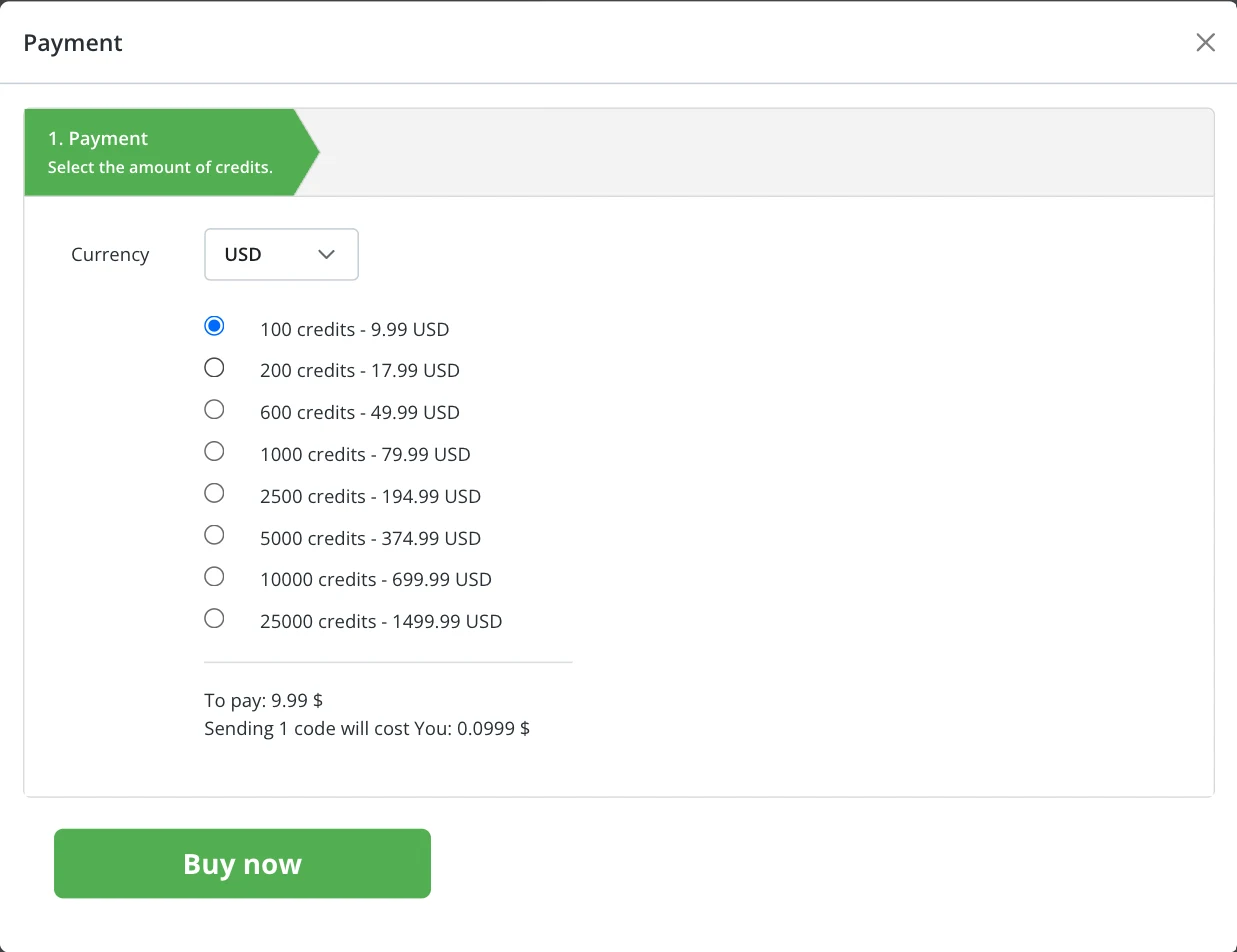
点击 Buy now 并完成结账。
Confirm it works
Billing 页面上的 Current Plan 积分数和 Balance 会立即更新,Invoices 表格中也会新增一行。更多页面说明见 了解账单和套餐。
Troubleshooting
| Symptom | Cause | Action |
|---|---|---|
| 结账后余额没有更新 | 结账尚未处理完成 | 等待一分钟后重新加载 Billing 页面 |
| 发票显示 Pending 而非 Paid | 付款尚未结算 | 几分钟后重新加载 Billing 页面;若超过一天仍为 Pending,请联系您的银行 |
| 积分已到账但订单未发货 | 购买积分和订单发货是两个独立的系统 | 确认 Billing 页面的积分余额大于零,然后在查看具体订单详情中检查该订单 |
If it still is not working
请提交一份工单,以便 Keysender 支持团队进行审核。
FAQ
结账后余额没有更新
等待一分钟后重新加载 Billing 页面 (结账尚未处理完成).
发票显示 Pending 而非 Paid
几分钟后重新加载 Billing 页面;若超过一天仍为 Pending,请联系您的银行 (付款尚未结算).
积分已到账但订单未发货
确认 Billing 页面的积分余额大于零,然后在查看具体订单详情中检查该订单 (购买积分和订单发货是两个独立的系统).
帮助中心中文